


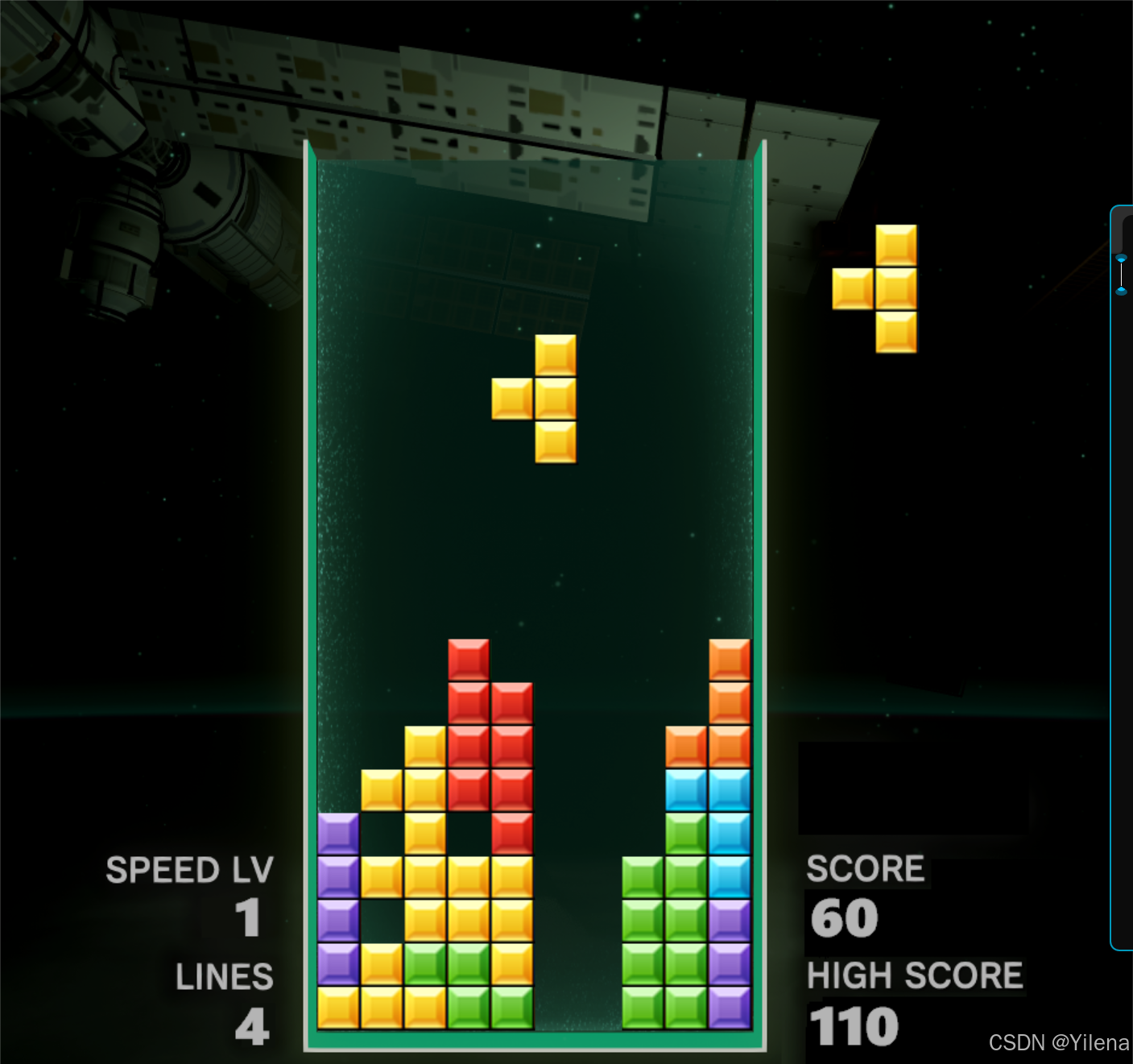
ps:美工素材来源于网络,如有侵权,请联系作者删除
一、整体效果展示
二、简介
相信大家都玩过,本游戏也是采用了经典的俄罗斯方块游戏规则:按方向键← →进行左右移动,↑ 进行方块的顺时针旋转,↓进行方块的迅速下落,消行可获得分数,累计获得一定分数可进入下一关,下落速度也会随之变快。
本项目使用的是EasyX图形库。
那废话不多说,下面就进行代码实现吧。
三、具体实现
(一)整体架构
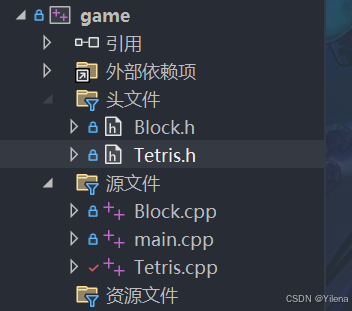
1.Block.h
#pragma once#include<graphics.h>#include<vector>using namespace std;
struct Point { int col; int row;};
class Block {public: Block(); void drop(); void move(int offset); void rotate(); void draw(int leftMargin, int topMargin); static IMAGE** getImgs(); Block& operator=(const Block& other); bool isOut(const vector<vector<int>>& map); void stop(vector<vector<int>>& map); int getBlockType();
private: int blockType; Point smallBlocks[4]; IMAGE* img;
static IMAGE* imgs[8]; static int size;};2.Tetris.h
#pragma once#include<vector>#include<graphics.h>#include "Block.h"#include <cstdlib>#include<ctime>#include<conio.h>#include<mmstream.h>#include<string>#include<fstream>#pragma comment(lib,"winmm.lib")using namespace std;
#define MAXLEVEL 5#define FILENAME "save.txt"
class Tetris {public: Tetris(int cols, int rows, int left, int top, int blockSize); void init(); void play();
private: int delay; bool update; vector<vector<int>>map; int rows; int cols; int left; int top; int blockSize; IMAGE background; Block* nowBlock; Block* nextBlock; Block lastBlock; bool isStop = true; int score = 0; int level; int removeLines; int highestScore; bool isGameOver = false; IMAGE overUI; IMAGE winUI;
const int NORMAL[MAXLEVEL] = { 500,300,200,125,90 }; const int QUICK = 50;
int getDelay(); void updateUI(); void drop(); void clearLine(); void keyEvent(); void move(int offset); void rotate(); void drawScore(); void checkGameOver(); void saveScore(); void showOver();};游戏架构主要分为两个对象,Block负责方块本身的性质,如方块的下落、旋转、绘制等,Teris负责游戏主体的性质,如键盘录入、更新画面、规则判定等。
具体在下面会进行实现。
(二)程序入口
#include "Tetris.h"
int main() { Tetris game(20,10,263,133,36); game.play(); return 0;}直接调用Tetris的函数即可。
(三)
//参数说明:行、列、左边距、上边距、方块尺寸Tetris::Tetris(int rows, int cols, int left, int top, int blockSize){ this->rows = rows; this->cols = cols; this->left = left; this->top = top; this->blockSize = blockSize;
for (int i = 0; i < rows; ++i) { vector<int>mapRow; for (int j = 0; j < cols; ++j) { mapRow.push_back(0); } map.push_back(mapRow); } score = 0; removeLines = 0; level = 1;
ifstream ifs(FILENAME); string Fline; if (ifs.is_open()) { while (getline(ifs, Fline)) { highestScore = stoi(Fline); } } else { cout << "读取失败" << endl; highestScore = 0; } ifs.close();}首先是对基础属性进行,map是游戏区域,首先初始化map全部为0,然后是初始化当前得分、消除行数以及当前关卡数,最后是进行本地文本操作,读取历史最高分数。
IMAGE* Block::imgs[8] = { nullptr, };int Block::size = 36;
Block::Block(){ if (imgs[1] == nullptr) { IMAGE imgTmp; loadimage(&imgTmp, "res/tiles.png");
SetWorkingImage(&imgTmp);
for (int i = 1; i < 8; ++i) { imgs[i] = new IMAGE; getimage(imgs[i], i * size, 0, size, size); }
SetWorkingImage(); }
/* 这种构造方法避免了每个方块都得额外开辟一个二维数组出来, 从而减少内存消耗 */ int blocks[7][4] = { 1,3,5,7, 2,4,5,7, 3,5,4,6, 3,5,4,7, 2,3,5,7, 3,5,7,6, 2,3,4,5 }; blockType = rand() % 7;
for (int i = 0; i < 4; ++i) { int value = blocks[blockType][i]; smallBlocks[i].row = value / 2; smallBlocks[i].col = value % 2 + 4; }
img = imgs[blockType + 1];}
Block& Block::operator=(const Block& other){ if (this == &other)return *this;
this->blockType = other.blockType;
for (int i = 0; i < 4; ++i) { this->smallBlocks[i] = other.smallBlocks[i]; }
return *this;}imgs数组是存放俄罗斯方块里七种不同的方块颜色的图片地址,之所以大小为8是因为0索引只是单纯的占位,不存放任何数据,使得方块颜色的图片的索引为1-7,便于对初始化为0做区分(0代表没有方块)。
构造函数中则是对imgs数组进行判断,若里面没有图片数据则进行添加。tiles.png图片如下所示:

因此要进行切割,然后再存放进数组当中去。
然后是其中不同类型的方块,再此我们用一个巧妙的方法将其中方块都到一个二维数组中:
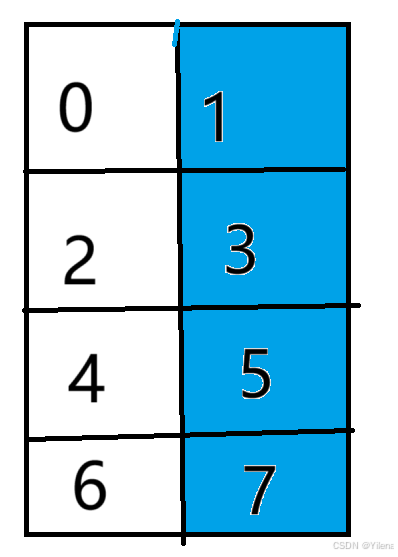
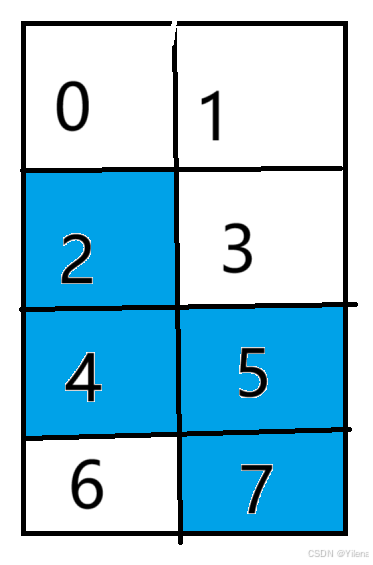
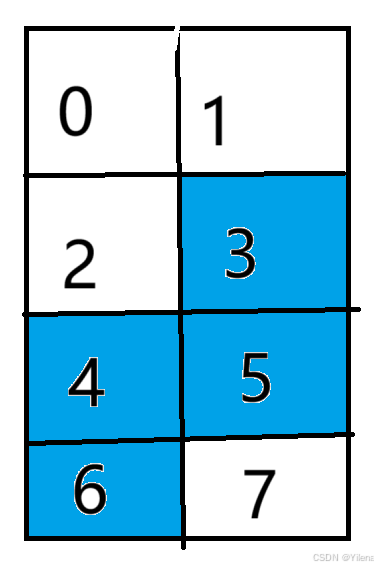
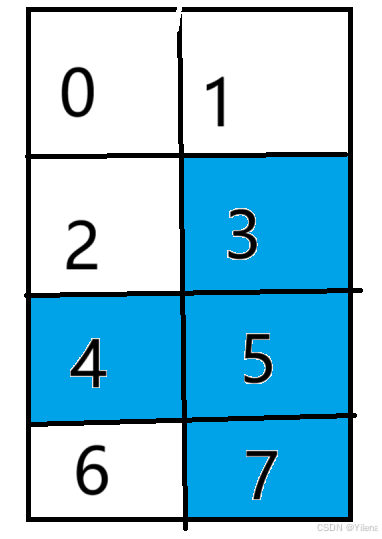
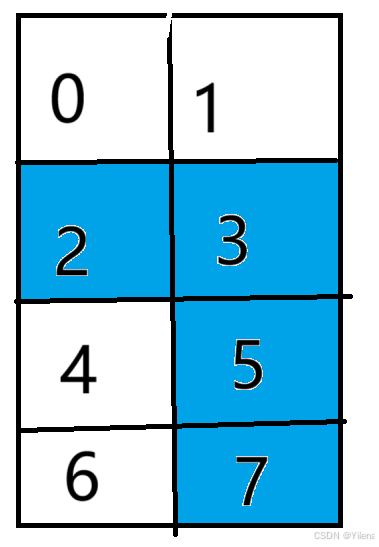
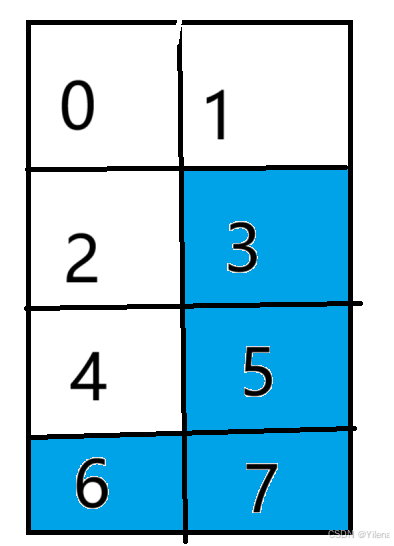
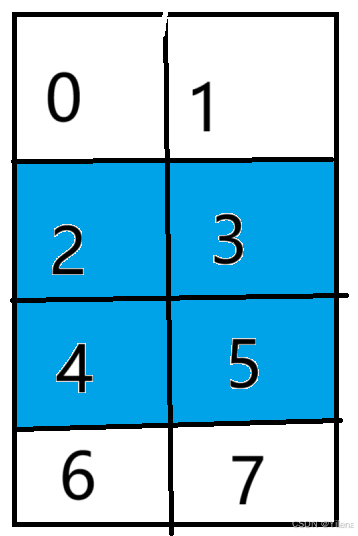
如此这般,我们便能在一个二维数组中存储其中方块,每种方块各占一行。
然后随机一个颜色赋予当前方块,而且我们能发现一个规律:每个方块的索引除以2的结果使其对应的行数,其余数则是列数,这也是我们这个方法的优点之一。
下面是赋值运算符的重载,只是最基础的对象赋值,没有什么说法。
(四)游戏主体循环
void Tetris::play(){ init();
nowBlock = new Block; nextBlock = nowBlock; nowBlock = new Block;
int time = 0;
while (true) {
keyEvent();
time += getDelay();
if (time > delay) { time = 0; drop(); update = true; }
if (update) { update = false; updateUI(); clearLine(); }
if (isGameOver) { saveScore(); showOver(); system("pause"); init(); } }}
int Tetris::getDelay(){ static unsigned long long lastTime = 0; unsigned long long currentTime = GetTickCount(); if (lastTime == 0) { lastTime = currentTime; return 0; } else { int ret = currentTime - lastTime; lastTime = currentTime; return ret; }}
void Tetris::init(){ mciSendString("play res/bg.mp3 repeat", 0, 0, 0); isGameOver = false; delay = NORMAL[0];
srand(time(0));
initgraph(938,896);
loadimage(&background, "res/bg2.png"); loadimage(&winUI, "res/win.png"); loadimage(&overUI, "res/over.png");
for (int i = 0; i < rows; ++i) { for (int j = 0; j < cols; ++j) { map[i][j] = 0; } }}首先初始化当前关卡,播放背景音乐并循环,然后将游戏结束判定设为否,在设置游戏帧率,实际上帧率对应的就是下落速度,帧率越高下落速度越快(每个帧率更新游戏界面)。接着设置随机数种子,然后就是加载图片,最后则是初始化map。
然后回到play函数,给当前方块一个新空间,然后再更新当前方块,最后再开一个空间给新的方块(实际上就是给当前方块和预告方块都分了一个空间),当它们构造的时候本身就已经有了随机方块的地址值了。接下来再使游戏时间为0,下面就是正式的循环部分了:先录入用户的键盘输入,然后实时更新当前游戏时间,若时间超过设定帧率,则更新游戏画面并判定是否需要消行,最后需要判断游戏是否结束,若是结束了则判定当前分数是否超过了历史最高分,如果是则需要存储到本地文件,接着展示游戏结束界面,需要判定是赢了还是输了在渲染出对应图片,最后再次调用函数进入下一个循环。
具体函数在下面进行实现。
(五)界面更新
void Tetris::updateUI(){ putimage(0, 0, &background);
IMAGE** imgs = Block::getImgs();
BeginBatchDraw(); for (int i = 0; i < rows; ++i) { for (int j = 0; j < cols; ++j) { if (map[i][j] == 0)continue; int x = j * blockSize + left; int y = i * blockSize + top; putimage(x, y, imgs[map[i][j]]); } }
nowBlock->draw(left, top); nextBlock->draw(545, 150);
drawScore(); EndBatchDraw();}先渲染背景图片,再获取方块颜色数组,接着开启区域绘制,先检测map内的非0区域,将其绘制上对应的色块,然后再绘制当前方块和预告方块以及当前分数,最后再结束区域绘制。
(六)画面渲染
1.方块渲染
void Block::draw(int leftMargin, int topMargin){ for (int i = 0; i < 4; ++i) { int x = leftMargin + smallBlocks[i].col * size; int y = topMargin + smallBlocks[i].row * size; putimage(x, y,img); }}根据调用Block对象的smallblocks属性,也就是对应位置(由于map的0索引是默认在窗口左上角,所以我们需要加上左边距和上边距),进行相应方块的渲染。
2.分数渲染
void Tetris::drawScore(){ char Text[32]; sprintf_s(Text, sizeof(Text), "%d", score); setcolor(RGB(180, 180, 180)); LOGFONT f; gettextstyle(&f); f.lfHeight = 60; f.lfWidth = 30; f.lfQuality = ANTIALIASED_QUALITY; strcpy_s(f.lfFaceName, sizeof(f.lfFaceName), _T("Segoe UI Black")); settextstyle(&f); setbkmode(TRANSPARENT); outtextxy(670, 727, Text);
sprintf_s(Text, sizeof(Text), "%d", removeLines); gettextstyle(&f); int x = 224 - f.lfWidth * strlen(Text); outtextxy(x, 817, Text);
sprintf_s(Text, sizeof(Text), "%d", level); outtextxy(224 - 30, 727, Text);
sprintf_s(Text, sizeof(Text), "%d", highestScore); outtextxy(670, 817, Text);}这基本都是固定写法,只需要设置字体、大小、颜色、位置等相关配置,接着进行渲染即可。
3.结束界面渲染
void Tetris::showOver(){ mciSendString("stop res/bg.mp3", 0, 0, 0); if (level <= MAXLEVEL) { putimage(262, 361, &overUI); mciSendString("play res/over.mp3", 0, 0, 0); } else { putimage(262, 361, &winUI); mciSendString("play res/win.mp3", 0, 0, 0); }}先要暂停游戏背景音乐的播放,接着判断游戏是否通关,若通关则进行失败界面的渲染并播放失败音效,反之同理。
(七)方块移动及旋转
void Tetris::drop(){ lastBlock = *nowBlock; nowBlock->drop();
if (!nowBlock->isOut(map)) { lastBlock.stop(map); delete nowBlock; nowBlock = nextBlock; nextBlock = new Block; isStop = true; delay = NORMAL[level - 1]; checkGameOver(); }}
void Block::drop(){ for (auto &blocks : smallBlocks) { blocks.row++; }}这是方块自身的自动下落(方块的四个点位的行数分别++即可),需要先备份当前方块的上一个位置,接着对当前方块的当前位置进行合法性的判定(是否出界),若不合法,则需要固化方块的上一个合法位置,并将当前方块的栈空间进行释放,以免泄漏,这样就实现了一个方块到达边界的固定。
接着更新当前方块,并给预告方块开辟一个新的空间(以免与当前方块共享同一个地址值),然后对方块是否固定进行true赋值,并恢复原本的帧率(因为可能是快速下落),最后再进行游戏结束的判定。
void Block::stop(vector<vector<int>>& map){ for (int i = 0; i < 4; ++i) { map[smallBlocks[i].row][smallBlocks[i].col] = blockType + 1; }}所谓固化就是将map对应的值赋值为当前方块的颜色类型,之后再update函数里便会对其进行渲染。
void Tetris::keyEvent(){ unsigned char ch; bool isRotate = false; int dx = 0; if (_kbhit()) { ch = _getch(); if (ch == 224) { ch = _getch(); if (ch == 80) { delay = QUICK; isStop = false; } if (isStop) { switch (ch) { case 72:isRotate = true; break; case 75:dx = -1; break; case 77:dx = 1; break; default: break; } } } }
if (isRotate) { isRotate = false; rotate(); }
if (dx != 0) { move(dx); update = true; }}
void Tetris::rotate(){ if (nowBlock->getBlockType() == 6)return; lastBlock = *nowBlock; nowBlock->rotate(); if (!nowBlock->isOut(map)) { *nowBlock = lastBlock; }}
void Block::rotate(){ Point p = smallBlocks[1]; for (int i = 0; i < 4; ++i) { //数学公式 Point tmp = smallBlocks[i]; smallBlocks[i].col = p.col - tmp.row + p.row; smallBlocks[i].row = p.row + tmp.col - p.col; }}
void Tetris::move(int offset){ lastBlock = *nowBlock; nowBlock->move(offset); if (!nowBlock->isOut(map)) { *nowBlock = lastBlock; }}
void Block::move(int offset){ for (int i = 0; i < 4; ++i) { smallBlocks[i].col += offset; }}首先初始化偏移量为0,接着就是键盘输入,方向键的值反馈到则是
↑:224 72
←:224 75
→:224 77
↓:224 80
因此我们要判定键盘输入两次。
首先如果是↓,则将帧率改为快速以实现视觉上的快速下落,且将isStop赋值为false,直到方块抵达到边界固化赋值为true之前都无法进行其他操作。
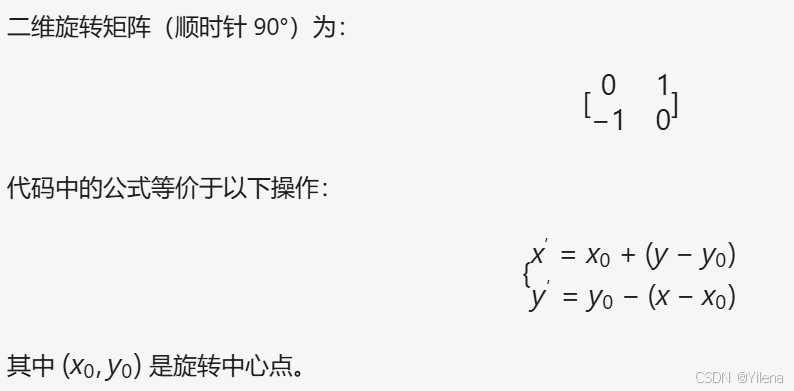
其次是↑,只用将isRotate改为true,然后调用Teris的rotate函数,先判断当前方块是否为田字形,若是则返回(田字形旋转与否都无任何变化),接着再备份上一个合法位置,若当前位置旋转后位置不合法,则返回上一个合法位置。至于旋转的具体实现则是在Block的rotate函数里,先取方块的重心,然后采用数学公式将方块的每个点位进行顺时针旋转。
最后是 ←→,向左则将偏移量赋值为-1,反之则为1,移动实现实质上与旋转并无区别,只是将方块的旋转变成了根据偏移量进行每个点位的水平移动,其他并无区别。
(八)出界判定
bool Block::isOut(const vector<vector<int>>& map){ int rows = map.size(); int cols = map[0].size(); for (int i = 0; i < 4; ++i) { if (smallBlocks[i].col < 0 || smallBlocks[i].col >= cols || smallBlocks[i].row < 0 || smallBlocks[i].row >= rows || map[smallBlocks[i].row][smallBlocks[i].col]) { return false; } } return true;}若方块点位越界或是对应的位置是否已经有方块存在则代表当前位置不合法,反之则合法。
(九)消行
void Tetris::clearLine(){ int line = 0; int saveLine = rows - 1; for (int i = rows - 1; i >= 0; --i) { int count = 0; for (int j = 0; j < cols; ++j) { if (map[i][j] != 0)count++; map[saveLine][j] = map[i][j]; } line++; if (count < cols) { saveLine--; line--; } }
if (line > 0) { int scoreLevel[4] = { 10,30,65,100 }; score += scoreLevel[line -1]; mciSendString("play res/xiaochu2.mp3", 0, 0, 0); level = (score + 99) / 100; removeLines += line; if (level > MAXLEVEL) { isGameOver = true; } update = true; }}先初始化消除行数line和存储行数saveLine,接着从下往上进行检测,并消除行数+1,若未满行就代表当前是需要存储的行,因此不做操作,saveLine—,再对消除行数-1。如此这般,若下次for循环检测到满行则会将未满的行进行覆盖,替换掉满行的位置,则会实现未满行数进行下移的视觉效果。
在检测结束后,若有需要消除的行数,则先根据当前消除的行数进行加分,再播放消行的效果音,接着根据当前获取的分数更改关卡数(每获得一百分则会进入下一个关卡)并对总消除行数进行赋值,若是当前关卡超过了最大关卡数,便通关了,判定isGameOver为true,最后令update为true更新当前游戏画面。
(十)游戏结束
void Tetris::checkGameOver(){ isGameOver = (nowBlock->isOut(map) == false) ? true : false;}
void Tetris::saveScore(){ if (score > highestScore) { highestScore = score; ofstream ofs(FILENAME); ofs << highestScore; ofs.close(); }}若是当前方块固定后下一个方块立马就出界,则代表下一个方块已经超出了行数,游戏结束。
然后检测当前分数是否超过历史最高分数,若超过则存储到本地文件。
四、源码
至此,大功告成!
码文不易,留个赞再走吧
原文链接: C++期末大作业:俄罗斯方块(附源码详解及美工素材) 作者: Yilena
如果这篇文章对你有帮助,欢迎分享给更多人!
部分信息可能已经过时